512 DMX channels. 255 faders.
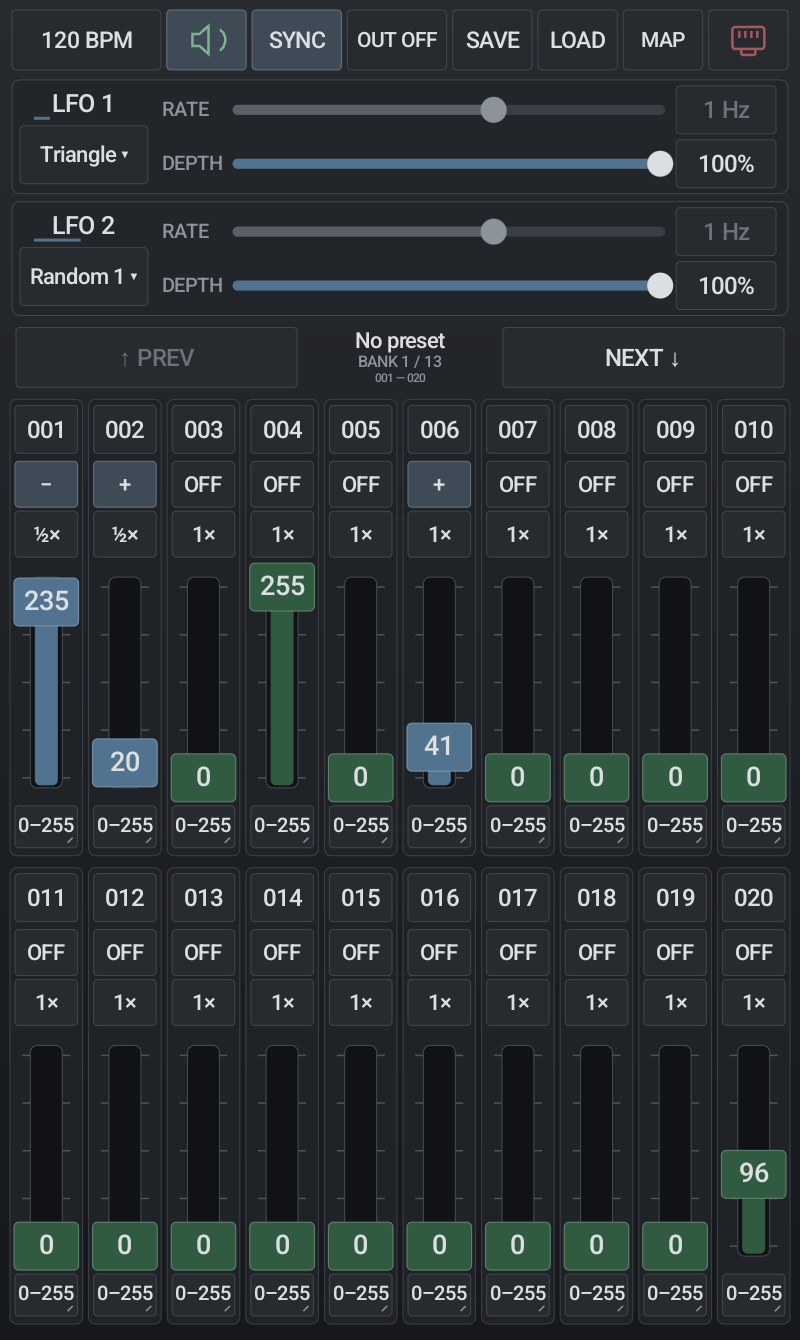
Control all 512 DMX channels in one Art-Net universe using 255 patchable faders. Work with 20 visible faders per bank, set individual ranges and save 64 named scene presets.
 SATURN FX
Android testing release. Google Play testing enrollment may be required.
Control all 512 DMX channels in one Art-Net universe using 255 patchable faders. Work with 20 visible faders per bank, set individual ranges and save 64 named scene presets.
Shape motion with independent modulation, direction and speed multipliers. Use a free rate or synchronize with the tempo clock.
Choose Ethernet or Wi-Fi in the network settings. A compatible Art-Net receiver converts packets into DMX for your fixture chain.
Hands-on performance
Map a keyboard or MIDI controller to presets, transport controls, BPM, both LFOs and all 255 channel faders. Controller mappings are global: recalling a scene keeps your assignments intact.
On Android, hold MAP and select “Connect Bluetooth MIDI” for compatible BLE-MIDI devices. Use different MIDI channels when controllers send overlapping note or CC numbers.
Drag BPM to adjust it, or tap to enter a value from 20–300. Free mode gives each LFO its own rate; Sync follows the tempo clock.
The app sends one unicast universe at up to 40 frames per second. Wi-Fi can introduce variable delay. No internet, account or cloud connection is required for local output.